

Whenever someone joins a team, they go through two onboarding processes. The first is learning the job: understanding the product, the business, the technology, the workflows and the tools. The second is learning the people. We usually have some form of onboarding for the first, even if it's informal. The second, however, is rarely approached with the same level of intention. Instead, we gradually discover how our colleagues work through day-to-day interactions. We learn who prefers brainstorming out loud and who likes time to think before sharing an opinion, we discover who appreciates spontaneous calls and who would rather receive a quick message first, we notice who likes detailed documentation, who communicates more effectively through diagrams or visual summaries and who prefers direct feedback over carefully worded conversations... None of these approaches is inherently better than another, but they can easily lead to misunderstandings when people aren't aware of each other's preferences.
The reality is that we usually learn these things through trial and error. Over time, we figure out which colleagues appreciate detailed context, who prefers concise communication, who likes discussing ideas before making a decision and who would rather reflect independently first. Sometimes that learning happens naturally, but often it happens because something didn't go as expected: a meeting that could have been an email, feedback that landed differently than intended, a decision that wasn't documented or assumptions that turned out to be incorrect. Eventually, we adapt to one another, but that process often takes weeks or even months, and much of that knowledge remains unwritten. It lives in conversations, personal experience and individual memory instead of somewhere the whole team can benefit from it.
Working together is more complex than ever
Today's workplaces look very different from those of just a decade ago. Many of us work in hybrid or fully remote environments, collaborate across different time zones and cultures and regularly interact with Product Managers, Designers, Engineers, C-level executives, Marketing teams, other stakeholders and external partners, each bringing different experiences, expectations and ways of working.
At the same time, it’s important to recognize that people don’t all process or communicate information in the same way. Some colleagues may have accessibility needs or be neurodivergent (for example ADHD, autism or dyslexia), while others may be working in a second language or come from professional or cultural backgrounds where collaboration norms differ. None of these differences need fixing. They are simply part of working with people. The challenge is that, unless we talk about them, everyone is left interpreting each other’s behavior. A preference for written communication might be mistaken for distance, and someone asking many questions may be seen as challenging decisions, when they’re actually trying to understand context. A colleague who needs time before responding may appear disengaged, when they are simply processing information.
So why don't we document how we work?
We already spend an enormous amount of time improving how people interact with our products. We invest in better onboarding experiences, clearer documentation, intuitive interfaces and knowledge sharing because we know these things reduce friction and help people succeed. Yet we rarely apply that same thinking to the way we collaborate with one another. Instead, we expect people to gradually learn how their teammates communicate, make decisions, give feedback and approach their work through experience alone. That made me wonder whether collaboration itself deserved better onboarding.
What is a User Manual?
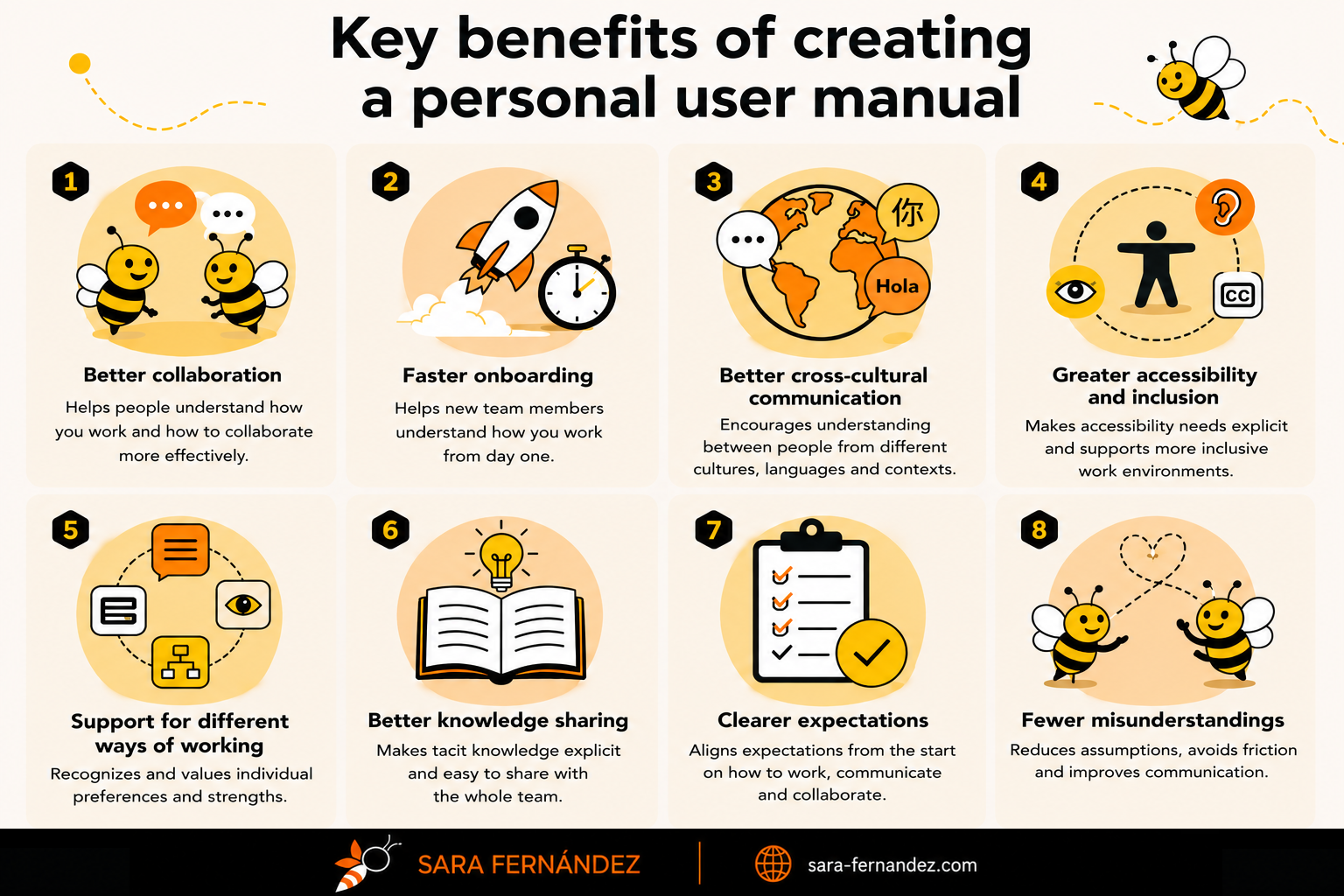
A personal user manual is a simple guide that explains how you tend to work best. It helps your teammates understand your communication preferences, your decision-making style, how you like to receive feedback, what helps you stay productive and what they can expect when collaborating with you. Think of it as onboarding documentation, but for people rather than products. The goal isn't to eliminate the natural process of getting to know your colleagues. Relationships are still built through conversations, shared experiences and trust over time. A user manual simply accelerates that process by making some of the most important information explicit from the beginning instead of leaving people to discover it through trial and error.
The idea is simple: the better we understand how the people around us work, the easier it becomes to collaborate effectively. Instead of spending weeks figuring out each other's preferences through experience alone, we can start with a shared understanding and refine it as we work together.
What a User Manual is not
A personal user manual is not a list of demands, nor is it a document telling people how they should behave around you. It's also not an excuse to avoid adapting to others. Collaboration is a two-way process. Just because I prefer a certain way of working doesn't mean I expect everyone else to do the same. The purpose is to create awareness, not rigid rules.
For example, if a colleague tells me they prefer written follow-ups after meetings, that's easy for me to accommodate. If another teammate needs more context before making a decision, I can adapt the way I communicate with them. Likewise, if I explain that I usually understand information more easily through diagrams than long blocks of text, my teammates know what tends to work best for me. These aren't difficult adjustments. They're small considerations that reduce unnecessary friction, improve communication and help people work together more effectively.
A user manual also isn't intended to replace regular conversations, feedback or trust. Those things are built over time through shared experiences. The manual simply provides a starting point by making expectations, preferences and working styles more visible from day one.
Why this matters now
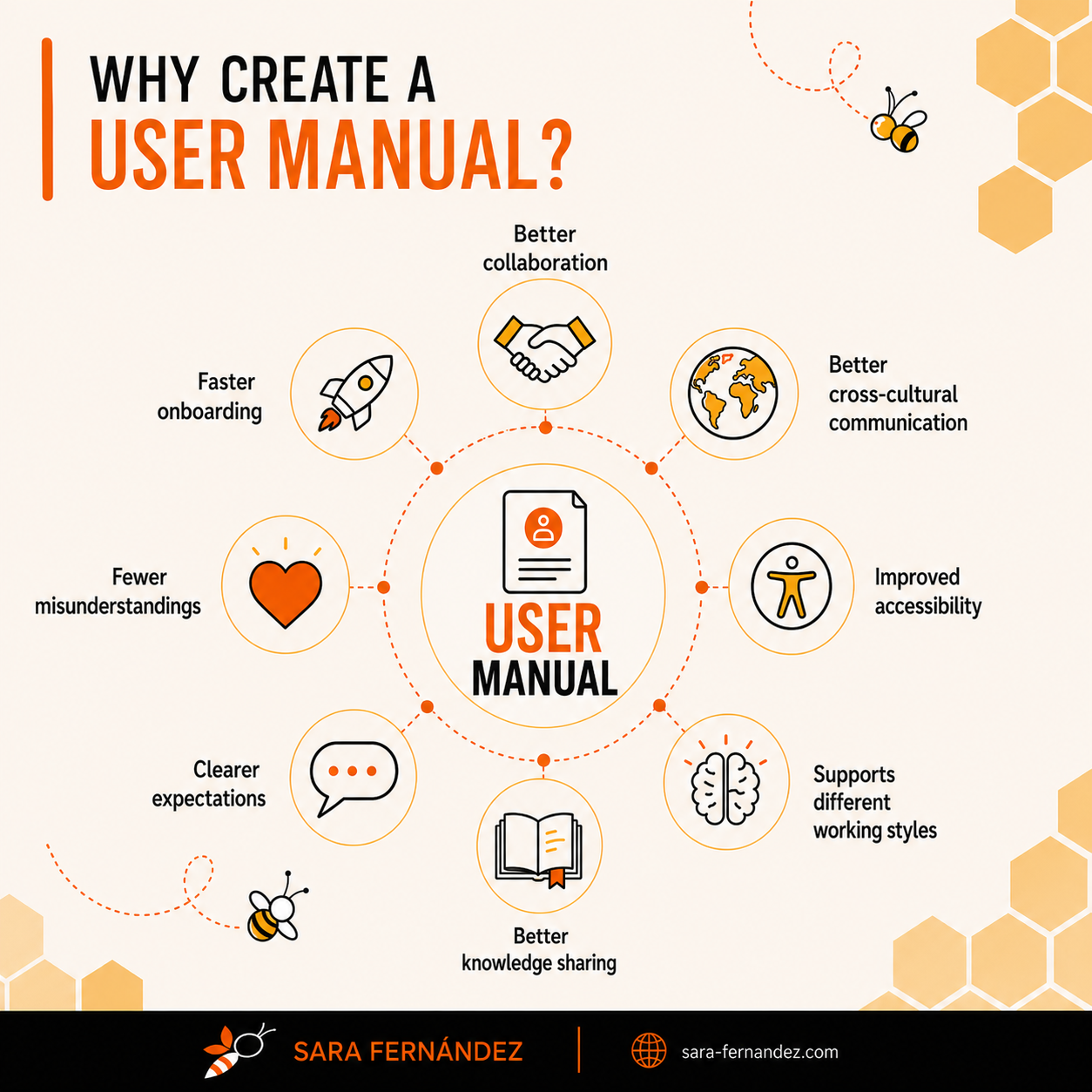
The way we work has changed significantly over the last decade, but many of our collaboration habits haven't evolved at the same pace. Not long ago, most teams worked from the same office, often within the same country and culture. Conversations happened naturally throughout the day, people could quickly clarify misunderstandings in person and, over time, everyone gradually learned how their colleagues preferred to work. Much of that knowledge was informal, but proximity made it easier to build.
Today's reality looks very different. Many teams are hybrid or fully remote, working across countries, cultures and time zones, often with colleagues they've never met in person. A single project might involve multiple stakeholders, each bringing their own expertise, experience and expectations of what good collaboration looks like. In that environment, we can no longer rely on proximity to learn how people work. We have to become more intentional about sharing information, setting expectations and creating a common understanding of how we collaborate.
At the same time, we have become much more aware that people process information differently. Some colleagues prefer to think out loud, while others need time to reflect before responding. Some are energized by workshops and brainstorming sessions, while others contribute their best ideas after reviewing the material independently. Some appreciate concise summaries, while others need additional context before feeling comfortable making a decision.
There are also accessibility and neurodiversity considerations that are often invisible unless people choose to share them. You may work with colleagues who have ADHD, autism, dyslexia or other cognitive differences that influence how they organize information, manage interruptions, communicate or process feedback. For example, someone with ADHD may work best with fewer context switches, clearer prioritization and fewer unplanned interruptions that break focus. They may prefer asynchronous communication over constant ad hoc questions, and benefit from written summaries to anchor their thinking. Others may have sensory sensitivities and work more effectively in quiet environments, with reduced noise, fewer simultaneous conversations, or the ability to use headphones to manage stimulation. Someone else may find back-to-back meetings draining and need buffer time to process information before moving into the next topic.
At the same time, colleagues with autism may prefer highly structured communication, explicit expectations and clear agendas in advance of meetings. Others with dyslexia may find dense written text harder to process and benefit more from diagrams, visual summaries or bullet-point structures. And many people may simply be navigating additional cognitive load due to working in a second language or adapting to cultural norms where communication styles differ significantly. None of these differences are obstacles, they are simply part of working with people.
The challenge is that, unless we talk about them, everyone is left trying to interpret each other's behavior. A preference for written communication might be mistaken for being distant. Someone who asks many questions may be perceived as challenging every decision, when in reality they're simply trying to understand the context. A colleague who needs time before responding may appear disengaged, when they are actually processing information before contributing. Many of the small frustrations teams experience are not caused by disagreements about the work itself, but by differences in how people approach that work.
We often spend weeks or months learning these patterns through experience when a simple conversation—or better yet, a shared document—could have established that understanding from the beginning. This is where a personal user manual becomes valuable. It doesn't eliminate the need for communication or replace the relationships that naturally develop over time. Instead, it provides a starting point. It makes invisible preferences visible, helps establish shared expectations and reduces unnecessary friction before it has a chance to grow. The goal is not to standardize how everyone works. In fact, the opposite is true. The goal is to acknowledge that people work differently and create an environment where those differences are understood rather than guessed. In fact, the more I think about it, the more I believe user manuals are not really about documentation, they're about empathy. Documentation simply happens to be one of the easiest ways to share that empathy with the people we work with.
Why Product Managers benefit especially
Although I believe a personal user manual can benefit almost anyone, I think Product Managers are in a particularly unique position to get value from it. Unlike many roles, Product sits at the intersection of multiple disciplines. On any given day, we might be discussing strategy with leadership, refining requirements with Engineering, reviewing user flows with Design, prioritizing work with Delivery, aligning with Marketing, answering questions from several stakeholders, coordinating with Procurement or speaking with external suppliers. Every conversation requires us to adapt our communication style, translate context between different audiences and help people move toward a shared understanding. Because of this, Product Managers spend a significant part of their time collaborating rather than working in isolation. The quality of our work is often influenced as much by how we communicate as by the decisions we make.
One of our core responsibilities is providing context. We help teams understand not only what needs to be built, but why it matters, who it is for and how it connects to broader business objectives. We facilitate discussions, help resolve trade-offs, document requirements, align expectations and bring together perspectives from people with very different expertise. The better those interactions are, the better the product usually becomes.
At the same time, Product Managers rarely work with the same group of people all the time. Projects change, priorities evolve and cross-functional teams are constantly forming and reforming. New engineers join, designers rotate between initiatives, suppliers become involved for specific projects and stakeholders change depending on the area of the business being discussed. Every new collaboration means learning how another person prefers to communicate, make decisions and share information. A personal user manual helps shorten that learning curve.
Instead of expecting colleagues to gradually discover that I prefer documenting important decisions, that I appreciate understanding the broader context before discussing solutions or that I find diagrams easier to process than long blocks of text, I can simply make those preferences visible from the beginning. That doesn't mean everyone has to work exactly like I do, it simply means they understand what helps me collaborate effectively, just as I want to understand what helps them.
I also believe Product Managers have an opportunity to lead by example. Much of our role is about improving collaboration, creating clarity and reducing unnecessary friction across teams. A user manual is simply another tool that supports those goals. By sharing our own working style openly, we encourage conversations that might not otherwise happen. Colleagues often respond by sharing their own preferences, discussing what helps them work effectively or reflecting on aspects of collaboration they had never consciously considered before.
In my experience, the biggest value isn't the document itself. It's the conversations that follow. Once people start talking openly about how they work, many small misunderstandings disappear before they even have a chance to happen. Teams become better at adapting to one another, meetings become more intentional and communication becomes more effective because people stop assuming that everyone approaches work in the same way. For Product Managers, whose success depends largely on bringing people together around a common goal, that can make an enormous difference.
Why every team can benefit
Although I've focused on Product Managers so far, I don't think personal user manuals belong exclusively to Product. In fact, the more I thought about the idea, the more I realized that almost every role involving collaboration could benefit from one.
Engineering Managers often need to explain how they like to communicate technical risks, how they prefer to receive requirements or when they should be involved in a discussion. Designers may want teammates to understand how they approach feedback, what information helps them create better experiences or why involving Design early usually leads to better outcomes. Researchers, Delivery Managers and Product Operations roles all have their own ways of working, communicating and making decisions that aren't always obvious to the people around them.
The same applies to leadership roles. Managers spend a significant part of their time coaching people, making decisions, providing feedback and setting expectations. A personal user manual can help new team members understand what kind of support they can expect, how one-to-one meetings are typically run, how decisions are made and what the manager values most when working with their team. Instead of leaving those expectations to emerge gradually, they become visible from the start.
Founders and C-levels can benefit just as much. As organizations grow, it becomes increasingly difficult for everyone to learn each leader's working style through informal interactions alone. A simple document explaining communication preferences, decision-making principles or expectations around collaboration can help reduce uncertainty, particularly for new hires who are still learning how the organization operates. Even individual contributors who don't manage people can find value in creating one. Every collaborative role involves working with others, sharing information, giving and receiving feedback, making decisions and solving problems together. Helping teammates understand how you work isn't about seniority—it's about making collaboration easier.
Personally, I think the greatest value appears when this becomes a team practice rather than an individual initiative. Imagine joining a new project where every team member has a short user manual. Within an hour, you could understand how people prefer to communicate, what helps them do their best work, how they like to receive feedback and what you can expect when collaborating with them. Instead of spending months discovering those things through experience, you would begin with a shared understanding that continues to evolve as relationships develop. That doesn't replace conversations or trust. Quite the opposite, it creates a better starting point for both.
What should a User Manual include?
There isn't a universal template for a personal user manual, and that's one of the reasons I like the idea so much. The document should reflect how you work, not how someone else thinks you should work. When I created my own, I didn't start with a checklist. Instead, I asked myself a simple question:
"What information would genuinely help someone collaborate with me more effectively?"
The answer became the different sections of my manual.
👤 About me
I think it's worth starting with a short introduction. Not your CV, not your career history and not your personality test results. Just a few sentences or bullet points that help people understand the person behind the role. For example, I mention that I enjoy solving problems, I'm naturally curious, I like exploring practical ways AI can help us work better and I believe the best ideas come from healthy discussions. These aren't things people need to know to work with me, but they help create a more human connection from the beginning.
📋 Quick facts
This is probably the section people will read first. Think of it as the executive summary of your manual. If someone only had one minute to understand how you work, what would you want them to know? Mine includes things like my preferred communication style, how I approach documentation, how I make decisions and the type of collaboration I find most effective. A simple table is usually enough.
💬 Communication
This is one of the most valuable sections because many day-to-day misunderstandings happen here. How do you prefer to communicate? When is a message enough? When does a call make more sense? Do you appreciate a heads-up before someone calls you? Do you like important decisions to be documented afterwards? For me, one of the core principles is:
"Discuss however makes the most sense. Document whatever matters."
I don't mind whether we solve something through Teams, a meeting or a quick call. What matters to me is making sure the outcome is documented so the team stays aligned and nobody has to rely on memory later.
🧩 How I work
This is where you explain the things that help you do your best work. Personally, I like understanding the why before diving into the how. I naturally ask questions about context, dependencies and expected outcomes because having the bigger picture helps me make better decisions. I also enjoy bringing structure to ambiguity. If I notice something could be documented more clearly, organized better or explained more visually, there's a good chance I'll try to improve it. This is also where I explain that I believe good documentation doesn't have to be long. Whenever possible, I prefer diagrams, flowcharts, tables or infographics over long blocks of text. The goal isn't to write more documentation—it's to make information easier to understand.
🤝 Collaboration
Every person approaches collaboration differently. This section is a good place to explain how you like to discuss ideas, receive feedback and make decisions together. For example, I enjoy healthy discussion and genuinely appreciate people challenging my ideas. If I ask a lot of questions, it's usually because I'm trying to understand the reasoning behind a proposal, not because I'm criticizing it. Likewise, I appreciate direct and constructive feedback. I'd rather have an honest conversation than spend time guessing whether something could have been improved.
🤖 AI and tools
This wasn't originally part of my manual, but I decided to include it because it has become an important part of how I work. I use AI every day to automate repetitive tasks, improve documentation, brainstorm ideas, summarize information and create diagrams or infographics. I also enjoy building Custom GPTs that help me automate recurring workflows. At the same time, I think it's important to clarify that AI is a co-pilot, not an autopilot. It helps me work more efficiently, but it doesn't replace critical thinking, professional judgment or collaboration with other people. Including this section has also become a great conversation starter. It's led to many interesting discussions with colleagues about prompts, workflows and ways we can use AI more effectively as a team.
✅ What helps me
One of my favorite sections is simply a list of the things that help me do my best work. Things like sharing business context, documenting important decisions, clarifying priorities or explaining constraints. They're all small actions, but together they make collaboration smoother.
🌱 What you can expect from me
I think this is an important section because a user manual shouldn't only describe what you expect from others. It should also explain what others can expect from you. For example, I commit to communicating openly, documenting important decisions, raising risks early, asking questions when something isn't clear and continuously looking for ways to improve how we work together. In many ways, this is the section that transforms the manual from a list of preferences into a mutual agreement.
❤️ One last thing
I like ending the manual with a short personal message. Mine is a reminder that good collaboration is built on trust, transparency and curiosity, and that I'd always rather ask questions than make assumptions. It's a small section, but I think it reinforces the purpose of the entire document: making it easier for people to work together.
Of course, your own manual doesn't need to look exactly like mine. The structure should reflect your role, your personality and your way of working. The important thing isn't whether you include these exact sections, it's whether someone finishes reading your manual with a much clearer understanding of what it's like to collaborate with you.
Make it visual
One mistake I would avoid is turning your user manual into a ten-page document. The goal isn't to document every detail about yourself or create a comprehensive reference that covers every possible scenario, it's much simpler: help people understand what it's like to work with you, that's why I believe the format matters almost as much as the content. Whenever possible, I recommend making your user manual visual. Most people won't read several pages of text before working with a new teammate, but they'll happily spend a couple of minutes looking at a well-designed infographic or a one-page summary.
Think about the way we already consume information at work. We use diagrams to explain architectures, flowcharts to describe processes, journey maps to understand users and dashboards to visualize data. Visual communication helps people absorb information more quickly, especially when they're trying to build a mental model of something new. The same principle applies here.
A user manual should be easy to scan. Someone should be able to identify your communication preferences, working style and collaboration principles within a few minutes, then come back to specific sections whenever they need a refresher. That doesn't mean removing detail altogether. If you enjoy writing, keep the longer version as a reference document and create a visual summary that people can quickly revisit. The two formats complement each other surprisingly well. Personally, I chose to create both: a more detailed written version and a one-page infographic that captures the key ideas at a glance. Depending on the situation, one format may be more useful than the other.
AI makes this easier than ever
Creating a visual user manual would have taken me considerably longer a few years ago. Today, AI has dramatically lowered the barrier. I regularly use AI to help me brainstorm ideas, improve documentation, structure information, create diagrams, generate infographics and automate repetitive work. Rather than replacing my thinking, it allows me to spend more time refining ideas and less time formatting documents or moving boxes around in design tools.
One workflow that has worked particularly well for me is using a Custom GPT that's configured with my company's brand guidelines and visual identity. Instead of starting from scratch every time I need a diagram or infographic, it helps me generate a first version that's already aligned with our branding, which I can then refine manually. The result isn't perfect—and I wouldn't expect it to be—but it significantly reduces the time required to transform ideas into something visual that can be shared with the team. Since I obviously can't use my employer's visual identity for a public article, all the examples in this post have been recreated using my own personal branding instead. The underlying idea is exactly the same: use AI to remove repetitive work so you can spend more time thinking about the content itself. Ultimately, I don't think AI's greatest value is writing documents for us. I think its greatest value is helping us communicate our ideas more effectively and making high-quality documentation accessible to far more people than ever before.
From theory to practice
Theory is useful, but I think examples are even more valuable. To illustrate the idea, I created my own user manual based on the framework I've described throughout this article. It summarizes how I prefer to communicate, what helps me do my best work, how I approach collaboration and what teammates can expect when working with me. Rather than replacing the written document, I use the infographic as a visual summary at the top of my Confluence page. It allows new teammates to understand the essentials in just a couple of minutes, while the sections below provide additional context for anyone who wants to dive deeper:
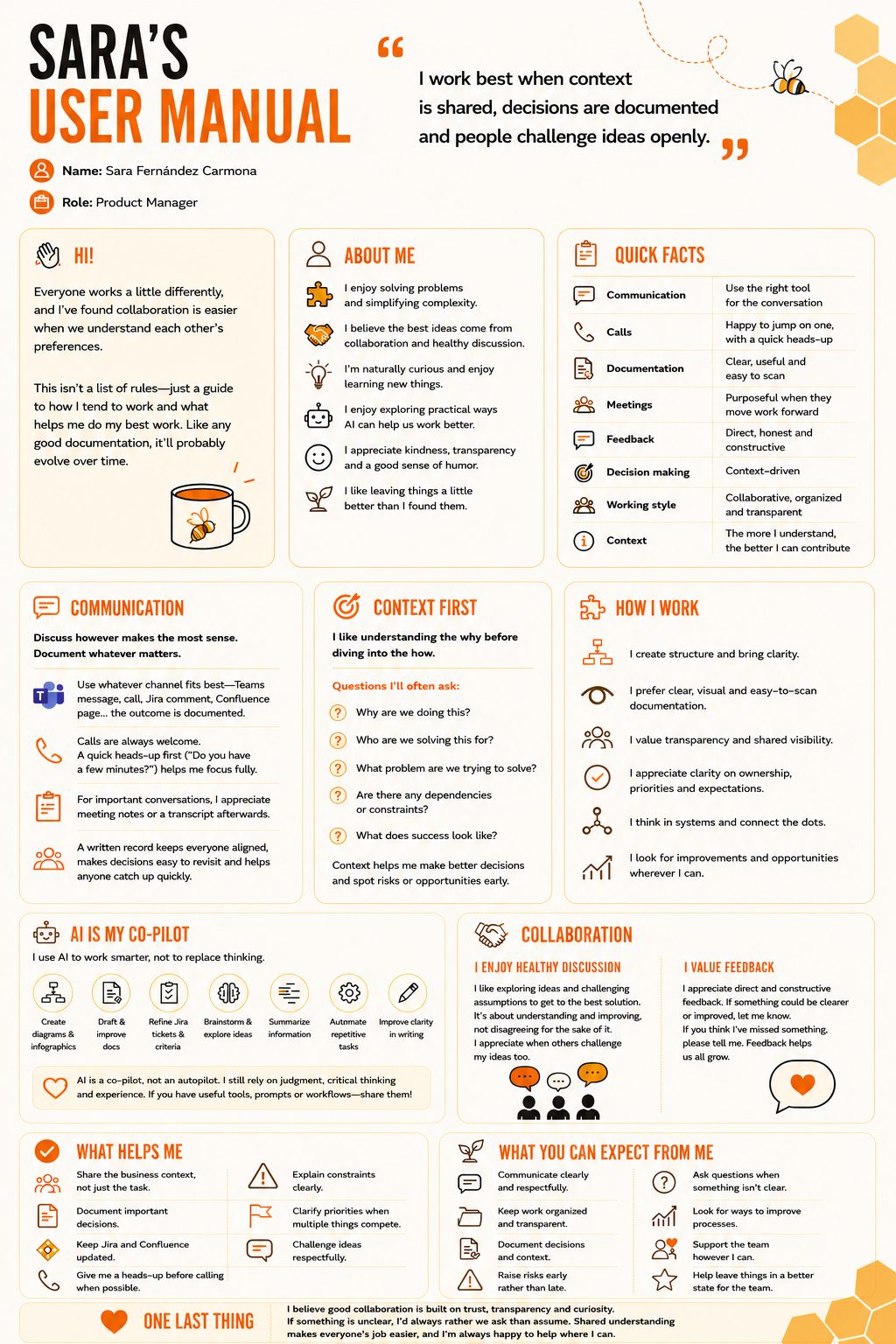
The full Confluence page expands on each section, but I find the infographic particularly useful because it's quick to scan, easy to revisit and simple to share during onboarding or when someone new joins the team. Neither version is intended to be a list of rules, and I'm sure they'll continue to evolve over time. Just like products, people change. We learn, adapt and refine how we work throughout our careers, so I see this as a living document rather than something that's ever truly finished. My hope is that sharing it encourages conversations that might not otherwise happen. If a teammate reads it and says, "actually, I work quite differently," that's already a success, because we've started talking openly about how we collaborate instead of assuming we're all the same.
Final thoughts
We spend a remarkable amount of time documenting the things we build. We document products, APIs, design systems, architectures, processes, runbooks and internal knowledge bases because we know that shared understanding helps teams move faster and make better decisions, yet one of the most important parts of any project—the people building it—is often left undocumented. A personal user manual won't solve every communication challenge, and it certainly won't replace trust, empathy or the conversations that naturally happen as relationships develop. What it can do is accelerate those conversations, reduce unnecessary friction and create a stronger foundation for collaboration from the very beginning. Perhaps the biggest lesson I took away from creating my own manual wasn't learning more about how I work. It was realizing how many of my working preferences had remained implicit for years. Simply taking the time to reflect on them made me more intentional about the way I communicate, collaborate and support the people around me.
Whether you're a Product Manager, an Engineering Manager, a Designer, a founder or anyone who works closely with others, I genuinely believe this is an exercise worth trying. Because, ultimately, the user manual isn't the goal. Better conversations are. The document is simply the catalyst, it encourages people to talk openly about how they communicate, how they make decisions, what helps them do their best work and how they can support one another more effectively. If creating a user manual helps your team replace assumptions with understanding, then it has already achieved its purpose. After all, we often say that products are built by people. Maybe it's time we started documenting the people behind the products with the same care we document the products themselves.
I'd love to know: if you were to create your own user manual, what would be the first thing you'd include?